.
Showing posts with label Processor. Show all posts

How to upgrade a laptop's processor

When you think of upgrading your notebook’s components, what comes to mind? Adding a copious amount of RAM? Plopping in a larger, faster hard drive, or an ultra-speedy solid state drive? Certainly those are most obvious examples of bettering your PC. But you can also add extra performance by replacing the CPU—which isn’t as difficult as it may sound.

The Tools

We decided to replace the 1.5-GHz Intel Celeron M processor that powers a four-year-old Lenovo ThinkPad Z60m with a 2.0-GHz Intel Pentium M760 processor (the other option for the machine when it was available for sale). We purchased the replacement CPU from eBay for $60 (you can also buy CPUs from such online vendors as www.newegg.com or www.tigerdirect.com), and a 3.5-ounce tube of Antec Formula 5 Silver Thermal Compound ($10; available at www.newegg.com), a paste which is used to wick heat away from the CPU. You’ll need a screwdriver for this operation, as well as rubbing alcohol.

Step 1: Remove the Palm Rest


  1. Power down your notebook. Turn it over so its bottom faces upward.
  2. Use the screwdriver to remove all visible screws so you’ll be able to detach the system’s bottom. We recommend pulling out the battery and hard drive as well, as there may be hidden screws that also need to be removed
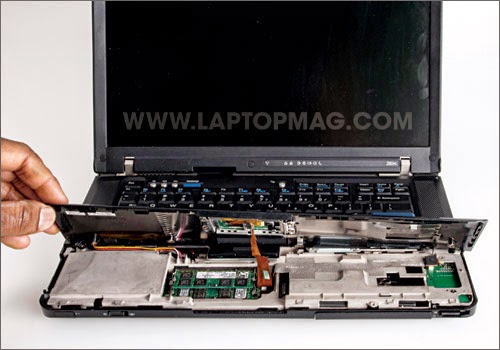
  3. Turn the notebook over. Carefully lift the edges of the palm rest until you’re able to gently detach it from the base. Be mindful not to lift it too swiftly, as there’s a cable that connects the touchpad to the base. 
 
How to upgrade a laptop's processor


Step 2: Detach the Keyboard


Carefully lift the keyboard and detach it from the notebook by unplugging the connection cable from the base.

How to upgrade a laptop's processor

Step 3: Lift the Heat Sink


Locate the heat sink (the large, copper-colored metallic object) and remove the screws that bind it into place. Beneath it you’ll find the processor that you want to swap out.
How to upgrade a laptop's processor
Use alcohol wipes to remove old thermal paste that may be attached to the heat sink.

How to upgrade a laptop's processor

Step 6: Add New Thermal Paste


Apply a small, but even amount of the Antec Formula 5 Silver Thermal Compound to the dark square that’s located in the center of the CPU. Then, place the heat sink on top of it. Press down firmly, yet gently.
How to upgrade a laptop's processor

Step 7: Re-assemble the Notebook

Reassemble the notebook and replace all the screws.

How to upgrade a laptop's processor

Best Computer Processor

 
 processor definition
 
 A central processing unit, also referred to as a central processor unit, is the hardware within a computer that carries out the instructions of a computer program by performing the basic arithmetical, logical, and input/output operations of the system
 
While buying a new personal computer, which is the one thing that matters above anything else? It's the computer's central processing unit (CPU) or processor. Silicon based chips are the brains of a computer that control every single one of its functions. The choice of processor decides the speed of computing and its multitasking ability. If you are planning to buy a new desktop or laptop computer, you would want to know which is the best processor to buy in the market.

Every computer chip today is a piece of silicon etched at nanometer (10-9 m) scales to form billions of transistors that together constitute the central processing unit of a computer. Today chip manufacturers have reached a limit in terms of the number of transistors that can be etched on a silicon chip and have instead opted for multicore chips. There are two, four or six chips that form a computer processor today, by working in coordination. This multicore design has helped chip makers like Intel to surpass the clocking frequency barrier and create faster chips.

Best Processors On the Market

The things that you look for in a computer processor are high speed of computing (represented by a high clocking frequency), multitasking, ability to handle intensive 3D graphics, larger cache size (which grants more working memory) and of course reasonable cost. The best processor chip for the money is expected to possess more than one of these features.

There are more than one way of choosing the best computer chip depending on what you are really looking for. There is the topmost processor that is above all others and beats them in all departments of computing and then there is the budget choice, which offers the best at moderate cost. We will consider both types here.

Unarguably the Best Processor to Buy - Intel Core i7 990X
If you are looking for simply the best and cutting edge for your laptop or desktop computer, the Intel core i7 990X is 'The One'. It is simply the best processor on the planet. The most power packed processor launched by Intel till date, this is a beast of a CPU, with 6 cores, 12 threads, 12 MB smart cache and a maximum clocking frequency of 3.46 GHz that can touch 3.73 GHZ on demand, thanks to Intel's Turbo Boost technology. Its 32nm architecture means that it is a leaner, yet more powerful beast than its 45nm build predecessors. Get over quad and dual cores, six core processors are here!

This is unarguably the best computer chip for gaming. Its power as a processor is boosted by Intel's Hyper threading, virtualization, 6.4 GT/s Intel QPI and speed step technologies. It is a processor born to rule and conquer gaming aficionados and power users. With all these features, the price tag on the chip is $999. The price is truly justified by the phenomenal performance and brute force powered by its 6 cores and 12 threads. It is truly one of a kind in the computing market today. In the same Intel core i7 extreme series, there are a few more processors to watch out for, which include (The processors with 'M' in their name are laptop processors):

Intel Core i7 980X (12 MB cache, 3.33 GHz)
Intel Core i7 975X (8 MB cache, 3.33 Ghz)
Intel Core i7 965 (8M Cache, 3.20 GHz)
Intel Core i7 940XM (8M Cache, 2.13 Ghz)
Intel Core i7 920XM (8M Cache, 2.00 Ghz)
Intel Core i7-2960XM (8M Cache, 2.70 Ghz)
Intel Core i7-2920XM (8M Cache, 2.50 GHz)

Best Budget Buys
The only problem with Intel core i7 990X and other processors from that series is the price which sets it beyond the reach of most mortals. However, there is a lot of choice in the lower ranks to choose from. As an AMD versus Intel chips comparison would reveal, top processors belonging to the other chip giant - AMD aren't in the same class as Intel's core i7. They are therefore competing with Intel by offering quad core chips at much lower prices. As the war between AMD and Intel processors rages on, we consumers are the one to benefit from the competition.

Here are some of the best CPUs to look out for, that fall in the medium and low-budget category, for you to choose from.

AMD Phenom II X6 1100T - $265
AMD Phenom II X6 1090T- $169
AMD Phenom II X4 980 - $185
AMD Phenom II X4 975 - $175
AMD Phenom II X4 965 Black Edition 3.4 GHz - $195
Intel Core i5 750 2.66 GHz - $196
Intel Pentium Processor G6950 2.80 - $87(!)
AMD Phenom II X2 550 3.1 GHz - $102

If you are looking for the best computer chip, any one from the above list will meet your requirements. This list of best processors only includes those which offer great computing power at medium to low prices. Though they may not reach the dizzying heights of computing power reached by Intel core i7 990X, they are good enough for most gaming applications, as well as office or home use. Choose one that suits your budget. Going for the best is always the right choice.


For search: Best Computer Processor, computer, Best Processor, Processor,

Intel and AMD Processor Comparison

Intel and AMD Processor Comparison

There is a reason why AMD's market share has been on a constant decline since 2006. Be it Intel's better marketing or AMD's lack of funding, the fight between the two seems to have cooled down for a short while. Things for AMD are not what they used to be in the early half of the previous decade. Despite that, AMD still has some amount of fight left, and considering that they once came ever so close to the top, they may do it again.

Intel and AMD Processor Comparison


Intel and AMD are the two largest manufacturers of processors on the planet right now. These big names are synonymous with the laptop and desktop processors available today. The launch of AMD's brand new 'FX Processors' along with AMD A-Series of processors were designed to counter Intel's second-generation core i3, core i5, and core i7 processors.

With the chip giants fighting for market supremacy, it's the consumers who stand to benefit. In the past few years, Intel had raced ahead with its superior 32 nm Sandy Bridge architecture, while AMD was found plugging holes in their sinking ship. AMD tried to change that in 2011 when they unveiled their new Opteron series.

Today, with both companies still fighting to beat the other, it's still evident that Intel outperforms AMD, but not by too much, if AMD's future plans are to be believed. AMD may be down, but it's definitely not out. Knowing what they have achieved, they still might have an ace up their sleeve.

Processor Comparison: Intel Vs. AMD

The battle between Intel and AMD is very well-known (I am excluding legal battles between them!). Every time, either of the two companies launch a new processor, the other comes up with its competitor version which is sometimes better than the original one. And the cycle continues, with technology being challenged at every step. To single out one processor to be better than the other is a daunting task. So here, we at Buzzle, have put forth a model-based comparison of these two processor giants. Let us start with the ones that are highly popular even today.

Intel Celeron D Vs. AMD Sempron

When Intel decided to upgrade its low-end processor series Celeron, the iteration upped the processor's performance. The architectural change of using the Sandy Bridge and Ivy Bridge architectures completely enhanced the processor line. On the other hand, as an answer to the Celeron upgradation, AMD replaced the Duron processor with the Sempron series. The first generation of Celeron D microprocessors were launched in June 2004, whereas the first generation of AMD Sempron microprocessors were launched in July 2004. The Sempron processor is based on K8 microarchitecture while Celeron processors are based on NetBurst microarchitecture. Let us have a look at the basic differences between the two models.

Feature Celeron D 360 Sempron 145
No. of Cores 1 1
Core Size 65nm 45nm
L2 Cache 512 KB 1 MB
Clock Speed 3.46 GHz 2.8 GHz
TDP 65W 45W

Intel Core 2 Duo Vs. AMD Turion II

The Turion II was the answer for Intel's Core 2 Duo processor launch. The first generation processors of the Core 2 duo family were launched in 2008, and it was only in 2010 that the Turion II was launched. The Intel Core 2 Duo was based on the Intel Core microarchitecture while the Turion II followed the K10 microarchitecture. The Turion II processor is based on the same architecture as the Phenom II and Athlon II. The main feature that differentiates the two processors is the power efficiency. Turion II is highly power efficient--almost 62% lower power consumption than its Intel's equivalent version.

Feature Core 2 Duo E8400 Turion II P560
No. of Cores 2 2
Core Size 45nm 45nm
L2 Cache 6 MB 2 MB
Clock Speed 3 GHz 2.5 GHz
TDP 65W 25W

Intel Core 2 Quad Vs. AMD Phenom II

The Phenom II processor was launched by AMD as a successor to Phenom in 2008 while its competitor was launched way before in 2006. The Phenom II X6 is the six-core processor from the Phenom family and is the fastest one ever made by AMD. On the other hand, the Core 2 Quad is a four-core processor based on the Intel Core microarchitecture. The Phenom II is based on the K10 microarchitecture.

Feature Core 2 Quad Q660 Phenom II X6 1045T
No. of Cores 4 6
Core Size 65nm 45nm
L2 Cache 8 MB 3 MB
Clock Speed 2.4 GHz 2.7 GHz
TDP 105W 95W

Intel Core i3 Vs. AMD A4

The A-Series of AMD processors are the ones that merge the CPU with a GPU to get enhanced performance. The A4 processors are the entry-level processors that are less expensive and can be used for casual gaming. The Core i3 series from Intel are their low-end processors succeeding the Core 2 series. The first generation of i3 was launched in 2010 while the A4 series' first generation was launched in 2011. The Nehalem microarchitecture i3 processors are available and so are the Sandy Bridge microarchitecture-based i3 processors that were launched in 2011. The A4 processors are based on AMD Fusion Family 12h microarchitecture.

Feature Core i3-560 AMD A4-3400
No. of Cores 4 6
Core Size 32nm 32nm
L2 Cache 512 KB 1 MB
Clock Speed 3.3 GHz 2.7 GHz
TDP 73W 65W

Intel Core i5 Vs. AMD A6

The Intel i5 processors using the Nehalem microarchitecture were launched in the year 2009 while those with Sandy Bridge microarchitecture were launched in 2011. The AMD A6 series were launched in 2011 based on K10 microarchitecture. The A6 series is more of a robust processor than the A4. These are suited for gaming and 3D modeling. The i5 series is similar to the i7 series except that the i5 series has less L3 cache memory. Like the i3 series, the i5 series has a good performance in HD 3000/4000.

Feature Core i5-2500S AMD A6-3620
No. of Cores 4 4
Core Size 32nm 32nm
L2 Cache 1 MB 4 MB
Clock Speed 2.7 GHz 2.2 GHz
TDP 65W 65W

Intel Core i7 Vs. AMD FX

Although this comparison simply takes the best from both the brands, it's not really a close competition. As far as price is concerned, you can equate the FX-8350 to Intel's i5 processors, but that's about it. AMD's buck stops there, while Intel goes on to offer the i7s. AMD released a brand new line of desktop processors in the form of its FX series, while Intel has kept upgrading its core i7 Extreme line with faster processors, each outclassing the one released before. Intel keeps superseding AMD in almost all fields except overclocking and price. The 3770k was the best in most benchmarking tests performed by most tech experts.

Feature Core i7-3770k AMD FX-8350
No. of Cores 4 8
Core Size 22nm 32nm
L2 Cache 8 MB 8 MB
Clock Speed 3.5 GHz 4 GHz
TDP 77W 125W

A Roundup Till Q1:2013

Both chip giants have unique approaches to processor architecture, but their ultimate aim is the same: creating the best processors on the planet that will empower individuals, homes, and businesses.

Intel pretty much devoured the field when it introduced the Sandy Bridge processors, leaving AMD with too much ground to cover. It was obvious that AMD could not retaliate in one go, so they opted to take the slow-and-steady route to get out of the problem. They have promised to show decent improvements in their current lineup. Although the Bulldozer was a terrible failure, Piledriver did put AMD back into the game by a smaller margin. Only time will tell how their next installments, Steamroller (next in line for 2013) and Excavator (ETA for 2014) will perform.

Ivy Bridge Vs. Bulldozer
All in all, here is what you--the general customer--should do. If money is an issue, or if you like to overclock your machine to get superior results, choose AMD. If you can spend extra and really want that extra step ahead to improve your work rate in video rendering, image editing, and audio recording, choose Intel. There was a time when the competition was so tough that choosing either wouldn't make too much of a difference. Neither company ever compromises on quality and provides excellent customer support. But the gap in performance was shocking when people compared the Ivy Bridge to the Bulldozer.

Playing "Catch Up" Forever
There are again a lot more points in the argument. But the bottom line stays this: Intel is better than AMD at single-threaded functions and overall performance. AMD fell too far behind when it released Bulldozer, the first in its Opteron series, but is catching up with its own word slowly. The way things are, it looks like AMD may catch up with Intel like it did in the early 2000s, but this may take a long, long time.

Unveiling Haswell
To make things worse for AMD, Intel has already released its successor to the Ivy Bridges series, Haswell, on June 4, 2013. Haswell basically adds another 5-10% improvement to the older Ivy Bridge, which was already 20% better than AMD's Piledriver. Steamroller is supposed to be AMD's next contender for the race, which will be released quite soon. It is expected to boost performance by 30% from Piledriver. But that still might not be enough to compete with Haswell.

Intel, AMD, and Gaming


We are currently in a kind of bottleneck situation when it comes to gaming. A lot of benchmark tests show that although Intel is better than AMD, it isn't breaking any AMD fanboy hearts. AMD can come pretty close to Intel on this front, and for some, it wins due to the price. There are now two basic things to consider:

▶ The first and simplest reason is that game engines haven't caught up to consumer hardware advances yet. With PC performances progressing by leaps and bounds every year, games still manage to get away using their older development kits. There aren't many games out there that will fully utilize multi-threading and multi-core usage. Which is to say, most games run on single core use, and while Intel is superior to AMD on single core use, it still isn't way too much.

▶ Another aspect is the cost of the entire PC. In the end, if an entire high-end hardware setup will cost around $1500 without the processor, would you now prefer buying AMD or Intel? The roughly $200 difference doesn't seem like much when you consider the entire hardware cost.

There are only two things that AMD can look forward to. One is the fact that both Sony and Microsoft have chosen AMD GPUs (Graphics Processing Unit) and APUs (Accelerated Processing Unit) for their PS4 and Xbox One consoles, respectively. The other is that although their hold over the low-end laptop and notebook processor segment (thanks to their extremely cheap and powerful A-Series APUs) seems to be slipping, it is still good enough to keep things moving, even though in the long run, AMD will need some good processors in the low- and high-end markets.

We can safely conclude that right now, Intel is ahead of AMD in terms of technology and performance. However, AMD still has the distinction of offering 'more for less'. Besides being an overclocker's delight, it continues to provide affordable processors which provide superb performance. Otherwise, AMD is still outclassed in the high-end processor market, quite substantially. Though it is slowly creating this niche for itself in the laptop processors' segment with its APUs, it has to put in a lot more to catch up with Intel in the mid- and high-end department.