
CCNA Exploration 1: Network Fundamentals v4.0 - Final Exam Answers – Full - 2013-2014
1. Which of the following are the address ranges of the private IP addresses? (Choose three.)
10.0.0.0 to 10.255.255.255
200.100.50.0 to 200.100.25.255
150.150.0.0 to 150.150.255.255
172.16.0.0 to 172.31.255.255
192.168.0.0 to 192.168.255.255
127.16.0.0 to 127.31.255.255
2. Which two functions of the OSI model occur at layer two? (Choose two.)
physical addressing
encoding
routing
cabling
media access control
3.
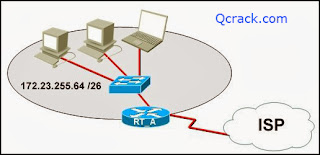
Refer to the exhibit. What function does router RT_A need to provide to allow Internet access for hosts in this network?
address translation
DHCP services
ftpd
web server
4. What is true regarding network layer addressing? (Choose three.)
uses a flat structure
prevent broadcasts
heirarchical
uniquely identifies each host
48 bits in length
contains a network portion
5.

Refer to the exhibit. Host A attempts to establish a TCP/IP session with host C. During this attempt, a frame was captured with the source MAC address 0050.7320.D632 and the destination MAC address 0030.8517.44C4. The packet inside the captured frame has an IP source address 192.168.7.5, and the destination IP address is 192.168.219.24. At which point in the network was this packet captured?
leaving host A
leaving ATL
leaving Dallas
leaving NYC
6.
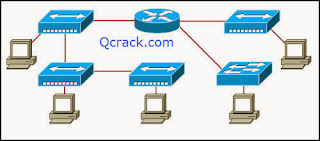
Refer to the exhibit. Assume all devices are using default configurations. How many subnets are required to address the topology that is shown?
1
3
4
5
7
7. A technician is asked to secure the privileged EXEC mode of a switch by requiring a password. Which type of password would require this login and be considered the most secure?
console
enable
enable secret
VTY
8.

Refer to the exhibit. A technician is working on a network problem that requires verification of the router LAN interface. What address should be pinged from this host to confirm that the router interface is operational?
127.0.0.1
192.168.64.196
192.168.254.1
192.168.254.9
192.168.254.254
9. Which OSI layer does IP rely on to determine whether packets have been lost and to request retransmission?
application
presentation
session
transport
10. When connectionless protocols are implemented at the lower layers of the OSI model, what is usually used to acknowledge that the data was received and to request the retransmission of missing data?
IP
UDP
Ethernet
a connectionless acknowledgement
an upper-layer, connection-oriented protocol or service
11.

Refer to the exhibit. Host C is able to ping 127.0.0.1 successfully, but is unable to communicate with hosts A and B in the organization. What is the likely cause of the problem?
Hosts A and B are not on the same subnet as host C.
The IP addresses on the router serial interfaces are wrong.
The subnet mask on host C is improperly configured.
The FastEthernet interface fa0/0 of router 1 is wrongly configured.
12.
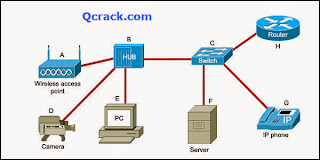
Refer to the exhibit. Which list refers only to end devices?
D,E,F,G
A,H,B,C
A,D,E,F
A,D,E,G
13.
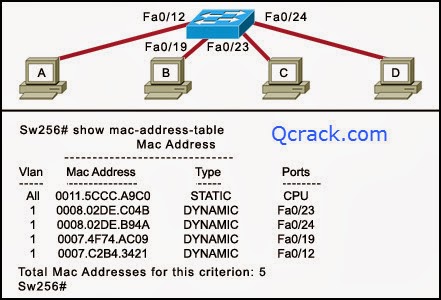
Refer to the exhibit. Host A sends a frame with the destination MAC address as FFFF.FFFF.FFFF. What action will the switch take for this frame?
It will drop the frame.
It will send the frame back to host A.
It will send the frame to all hosts except host A.
It will forward the frame to the default gateway.
14. Which subnet mask will allow 2040 hosts per subnet on the IP network 10.0.0.0?
255.255.0.0
255.255.254.0
255.255.252.0
255.255.248.0
255.255.240.0
255.255.255.128
15.

Refer to the exhibit. RouterB is configured properly. The Ethernet interface Fa0/0 of RouterA is configured with the use of the commands that are shown. However, a ping from the Fa0/0 interface of RouterA to the Fa0/0 interface of RouterB is unsuccessful. What action should be taken on RouterA to solve this problem?
Use the description command on the FastEthernet interface Fa0/0.
Configure the clock rate of the FastEthernet interface Fa0/0.
Use the no shutdown command on the FastEthernet interface Fa0/0.
Reboot the router.
16. To send data through a network, what two flags are used to establish a session? (Choose two.)
ACK
CRC
SYN
Ack #
Port #
Seq #
17. Which statement is true about the TTL value of an IPv4 packet?
It determines the priority of a packet.
It specifies the remaining “life” of the packet.
It indicates that the packet has been fragmented.
It denotes the data payload type that the packet is carrying.
18.
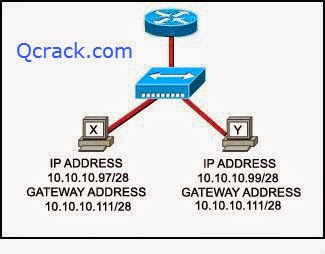
Refer to the exhibit. Communication for hosts X and Y is restricted to the local network. What is the reason for this?
Host X is assigned a network address.
Host Y is assigned a multicast address.
Host X and host Y belong to different networks.
The gateway addresses are broadcast addresses.
19. What type of network is maintained if a server takes no dedicated role in the network?
mainframe
client/server
peer-to-peer
centralized
20. A routing issue has occurred in your internetwork. Which of the following type of devices should be examined to isolate this error?
access point
host
hub
router
switch
21. Which physical component is used to access and perform the initial configuration on a new unconfigured router?
Correct answer is image 2 , CONSOLE !


22. A user sees the command prompt: Router(config-if)# . What task can be performed at this mode?
Reload the device.
Perform basic tests.
Configure individual interfaces.
Configure individual terminal lines.
23. What is the correct order for PDU encapsulation?
Correct answer is first image !


24. What information can be gathered by using the command netstat?
the default gateway
the routing protocol
active TCP connections
the locally configured subnet mask
25. How can ARP be used to help document the network?
It can list each hop on the way to a destination host.
It can show the average latency of hosts on the network.
It can provide a list of physical addresses on the network.
It can indicate which hosts are not responding to network traffic.
26. What is the protocol data unit that is associated with the data link layer of the OSI reference model?
data
frame
packet
segment
27. Which application layer protocol allows administrators to log into a server from remote locations and control a server as though logged in locally?
DNS
FTP
DHCP
SMTP
Telnet
28. Which statement identifies the DNS protocol?
It transmits information using TCP port 25.
It transfers and conveys information using HTML pages.
It matches a resource name with the required network address.
It requests and assigns an IP address, default gateway, and server addresses to hosts.
29. Which password would allow a user to establish a Telnet session with a Cisco device?
VTY password
enable password
console password
enable secret password
30. Which identifier is contained in the header of the Layer 2 Ethernet frame?
timing and synchronization of bits
source and destination port numbers
logical source and destination addresses
physical source and destination addresses
31. What happens when a node on an Ethernet network is creating a frame and it does not have the destination MAC address?
The node drops the frame.
The node sends out a Layer 3 broadcast message.
The node sends a message directly to the router for the address.
The node sends out an ARP request with the destination IP address.
32. An administrator makes changes to the default configuration of a router and saves them to NVRAM. After testing, it is discovered that the configurations did not have the desired effect and must be removed. What steps must be taken to remove the changes and return the router to the default configuration?
Reboot the router.
Use no version of the commands that are issued.
Issue the erase startup-config command, and then reboot the router.
Issue the erase running-config command, and then reboot the router.
33. A network administrator is tasked with connecting two workgroups that are configured to use different subnets. Which device should be selected to allow connectivity between users on the two networks?
hub
switch
router
wireless access point
34. Which two programs can be used to accomplish terminal emulation for configuring a router from the CLI through the console port? (Choose two.)
HyperTerminal
Internet Explorer
Minicom
Secure Shell
Telnet
35. Which statement accurately describes file sharing in a peer-to-peer network?
A dedicated server is required.
Access control is decentralized.
Files are typically stored on the most powerful peer in the network.
Peers can either make requests, or respond to requests, but not both.
36. What are two primary responsibilities of the Ethernet MAC sublayer? (Choose two.)
frame delimiting
data encapsulation
logical addressing
error detection
accessing the media
37. Which router configuration mode would an administrator use to configure the router for SSH or Telnet login access?
line
router
global
interface
privileged EXEC
38.

Refer to the exhibit. Which device should be included in the network topology to provide Layer 2 connectivity for all LAN devices, provide multiple collision domains, and also provide a connection to the rest of the network?
server
hub
switch
PC
39.

Refer to the exhibit. A technician has been asked to test connectivity from PC1 to a remote network. Which action will indicate if there is remote connectivity?
Correct answer is first image !


40. What purpose does a hostname serve on a router?
uniquely identifies a router on the internet
used by routing protocols to identify peer routers
provides device identification to users logging on remotely
determines the hosts that are allowed to connect to the device
41. Which prompt is associated with the privileged exec mode?
R1>
R1#
R1(config)#
R1(config-router)#
42. A technician wishes to connect two computers to move data from one to the other before reloading the operating system. The NICs on both PCs do not support autosensing feature. Which procedure will satisfy the requirement?
Interconnect the two PCs with a rollover cable.
Interconnect the two PCs with two rollover cables and a hub.
Interconnect the two PCs with a crossover cable.
Interconnest the two PCs with two crossover cables and a hub.
43.

Refer to the exhibit. Interface Fa0/0 on router A is generating excessive broadcast traffic. Which LAN segments will affected by the excessive broadcasts?
Only the 192.168.1.200/30 network will be affected.
Only the link between 192.168.1.201 and port Fa0/5 on SW1 will be affected.
Both the 192.168.1.200/30 and 192.168.1.204/30 networks will be affected.
Only the links between 192.168.1.201 and port Fa0/7 on SW2 will be affected.
44. Two routers are connected via their serial ports in a lab environment. The routers are configured with valid IP addresses, but they cannot ping each other. The show interface serial0/0 command shows that the serial0/0 interface is up but the line protocol is down. What could be the cause of this problem?
The no shutdown command has not been applied to the interfaces.
The clock rate command has not been entered on the DCE interface.
The interface timers are not cleared.
The FastEthernet interface is emulating a serial interface by assigning it a timing signal.
45.

Refer to the exhibit. Which layered network model is shown in the diagram?
Cisco
IETF
OSI
TCP/IP
46.

Refer to the exhibit. Host A is unable to reach host B on the remote network. A technician attempted to ping the local gateway and the ping was successful. To verify the host configuration, the technician issued the ipconfig command. What is the likely cause of the problem?
The local NIC is incorrectly configured.
The subnet mask on host A is incorrectly configured.
The IP address on host A is incorrectly configured.
The default gateway on host A is incorrectly configured.
47. Which option shows how a router will route packets to a remote network?
Correct answer is image 4 !


48. An organization has been assigned network ID 10.10.128.0 and subnet mask 255.255.224.0. Which IP address range can be used for this organization?
10.10.128.0 to 10.10.160.255
10.10.128.0 to 10.10.159.255
10.10.128.0 to 10.10.192.255
10.10.128.0 to 10.10.0.159
10.10.128.0 to 10.10.159.0
49. A network administrator is configuring several switches for a network. The switches have similar configurations and only minor differences. The administrator wants to save all commands that are issued on the first switch to a text file for editing. Which transfer option should be selected in HyperTerminal?
Correct answer is image 3, CAPTURE TEXT !


50. When must a router serial interface be configured with the clock rate command?
when the interface is functioning as a DTE device
when the interface timers have been cleared
when the connected DTE device is shut down
when the interface is functioning as a DCE device
51. Due to a security violation, the router passwords must be changed. What information can be learned from the following configuration entries? (Choose two.)
Router(config)# line vty 0 3
Router(config-line)# password c13c0
Router(config-line)# login
The entries specify three Telnet lines for remote access.
The entries specify four Telnet lines for remote access.
The entries set the console and Telnet password to “c13c0″.
Telnet access will be denied because the Telnet configuration is incomplete.
Access will be permitted for Telnet using “c13c0″ as the password.
52. Which password is automatically encrypted when it is created?
vty
aux
console
enable secret
enable password
53.

Refer to the exhibit. A network technician is trying to determine the correct IP address configuration for Host A. What is a valid configuration for Host A?
IP address: 192.168.100.19; Subnet Mask: 255.255.255.248; Default Gateway: 192.16.1.2
IP address: 192.168.100.20; Subnet Mask: 255.255.255.240; Default Gateway: 192.168.100.17
IP address: 192.168.100.21; Subnet Mask: 255.255.255.248; Default Gateway: 192.168.100.18
IP address: 192.168.100.22; Subnet Mask: 255.255.255.240; Default Gateway: 10.1.1.5
IP address: 192.168.100.30; Subnet Mask: 255.255.255.240; Default Gateway: 192.168.1.1
IP address: 192.168.100.31; Subnet Mask: 255.255.255.240; Default Gateway: 192.168.100.18
54. Which prompt represents the appropriate mode used for the copy running-config startup-config command ?
Switch-6J>
Switch-6J#
Switch-6J(config)#
Switch-6J(config-if)#
Switch-6J(config-line)#
55.

Refer to the exhibit. The tracert command is initiated from PC1 to PC4. Which device will send a response to the initial tracert packet from PC1?
Athens
Ankara
London
Paris
PC4
56. Which information is used by the router to determine the path between the source and destination hosts?
the host portion of the IP address
the network portion of the IP address
host default gateway address
the MAC address
57.

Refer to the exhibit. A PC is communicating with another PC on a remote network. The two networks are connected by three routers. Which action will help to identify the path between the hosts?
Use the ipconfig command at the host.
Use the ipconfig/all command at the destination.
Use the tracert command at the host.
Use the ping command at the destination.
58.

11. Refer to the exhibit. The diagram represents the process of sending e-mail between clients. Which list correctly identifies the component or protocol used at each numbered stage of the diagram?
1.MUA 2.MDA 3.MTA 4.SMTP 5.MTA 6.POP 7.MDA 8.MUA
1.MUA 2.POP 3.MDA 4.SMTP 5.MTA 6.MDA 7.SMTP 8.MUA
1.MUA 2.POP 3.SMTP 4.MDA 5.MTA 6.SMTP 7.POP 8.MUA
1.MUA 2.SMTP 3.MTA 4.SMTP 5.MTA 6.MDA 7.POP 8.MUA
59.

Refer to the exhibit. The router of the company failed and was replaced. After the replacement, hosts C and D in the Education office are able to ping each other, but they are unable to access the hosts in the Accounts office. What is the likely cause of the problem?
The IP address at the fa0/0 interface of the router is incorrectly configured.
The subnet mask at the fa0/1 interface of the router is incorrectly entered.
The IP address at the serial interface of the router is incorrectly configured.
The hosts in the Accounts office are not on the same subnet as the hosts in the Education office.
60.

Refer to the exhibit. Host A and B are unable to communicate with each other. What is the reason for this?
Host A is assigned a network address.
Host B is assigned a multicast address.
Host A and host B belong to different networks.
The gateway addresses are network addresses.
61.

Refer to the exhibit. Host B attempts to establish a TCP/IP session with host C. During this attempt, a frame was captured at the FastEthernet interface fa0/1 of the San Francisco router. The packet inside the captured frame has the source IP address 10.10.1.2, and the destination IP address is 10.31.1.20. What is the destination MAC address of the frame at the time of capture?
0060.7320.D632
0060.7320.D631 0040.8517.44C3
0009.B2E4.EE03
0010.C2B4.342
62.

Refer to the exhibit. While configuring a network, a technician wired each end of a Category 5e cable as shown. Which two statements are true about this setup? (Choose two.)
The cable is suitable for connecting a switch to a router Ethernet port.
The cable is suitable for connecting dissimilar types of devices.
The cable is unusable and must be rewired.
The cable is terminated in a way that the transmit pin is wired to the receive pin.
The cable simulates a point-to-point WAN link.
63. Well-known services and applications use which range of TCP/UDP port numbers?
0 to 255
0 to 1023
1024 to 49151
49152 to 65535
64. Which three IPv4 addresses represent subnet broadcast addresses? (Choose three.)
192.168.4.63 /26
192.168.4.129 /26
192.168.4.191 /26
192.168.4.51 /27
192.168.4.95 /27
192.168.4.221 /27
65. Which three statements are true about network layer addressing? (Choose three.)
The addresses are 48 bits long.
Network layer addressing is used by Ethernet switches to make forwarding decisions.
It uses a hierarchical structure.
It does not support broadcasts.
It uniquely identifies each host.
A portion of the address is used to identify the network.
66. Which OSI layer addressing is required to route packets between two networks?
Layer 1
Layer 2
Layer 3
Layer 4
67.

Refer to the exhibit. Host A is requesting a web page from the web server. Which option represents the socket to which the request is made?
80
www.cisco.com
10.0.0.130
10.0.0.130:80
68.

Which statement describes the correct use of addresses to deliver an e-mail message from HostB to the e-mail service that is running on ServerA?
HostB uses the MAC address of ServerA as the destination.
Router B uses a Layer 3 network address to route the packet.
Router A uses the Layer 4 address to forward the packet to Router B.
Via the use of a Layer 3 address, ServerA assigns the message to the e-mail service.
69.

Refer to the exhibit. Host A is configured with the correct IP address for the default gateway of the router R1 FastEthernet0/1 interface. How will a packet that is sent from host A to host B be handled by the devices on the network?
R1 will drop the packet because R1 does not have a specific route in its routing table to the 10.1.1.0/24 network.
R1 will forward the packet to its default gateway, the next hop router R2. R2 will forward the packet to the directly connected network 10.1.1.0/24.
R1 will forward the packet to its default gateway, the next hop router R2. R2 will drop the packet because it does not have a default route to network 10.1.1.0/24.
R1 will forward the packet to its default gateway, the next hop router R2. R2 will drop the packet because it does not have a route that is learned by a routing protocol to network 10.1.1.0/24.
70. Which option correctly identifies the interface or interfaces used to connect the router to a CSU/DSU for WAN connectivity?
This correct answer is image 4 ( last image ).


71. How many host addresses may be assigned when using the 128.107.0.0 network address with a subnet mask of 255.255.248.0?
30
256
2046
2048
4094
4096
72. During the encapsulation process, what is the PDU of the internet layer?
bit
data
frame
packet
segment
73. Which service is used when the nslookup command is issued on a computer?
FTP
DNS
DHCP
Telnet
74.

Refer to the exhibit. A network technician creates equal-sized subnets of network 192.168.2.0/24 using the subnet mask 255.255.255.224. If the technician wishes to calculate the number of host addresses in each subnet by using the formula that is shown in the exhibit, what value will be used for n?
1
2
3
4
5
75. What are the default terminal emulation software settings when configuring a Cisco device through a console port?
Bits per second: 19200
Data bits: 7
Parity: None
Stop bits: 0
Flow control: None
Bits per second: 9600
Data bits: 8
Parity: None
Stop bits: 1
Flow control: None
Bits per second: 19200
Data bits: 7
Parity: None
Stop bits: 0
Flow control: Hardware
Bits per second: 9600
Data bits: 8
Parity: None
Stop bits: 1
Flow control: Hardware
76. In a packet-switched data network, what is used to reassemble the packets in the correct order at the destination device?
source address
sequence number
priority assignment
destination address
77.

Refer to the exhibit. A network administrator tries to test the connectivity between routers R1 and R2, but the attempt to ping is unsuccessful. Based on the show ip interface brief command outputs, what could be the possible cause of the problem?
Interface S0/0/0 on router R1 is shut down.
Interface S0/0/0 on router R1 is configured with an incorrect IP address.
Interface S0/0/0 on router R2 is administratively down.
Interface S0/0/0 on router R2 does not have the clock rate settings configured.
78. Which router configuration mode will require user authentication if an administrator issues the enable secret command?
user executive mode
privileged executive mode
global configuration mode
service specific configuration mode
79. Which location of router memory is cleared with the erase startup-config command?
flash
RAM
ROM
NVRAM
80. Which subnet mask should be used for a Class B network that is divided into subnets and will accommodate between 800 hosts and 1000 hosts?
255.255.255.0
255.255.254.0
255.255.252.0
255.255.248.0
255.255.240.0
81.

Refer to the exhibit. The network containing router B is experiencing problems. A network associate has isolated the issue in this network to router B. What action can be preformed to correct the network issue?
issue the clock rate command on interface Serial 0/0/0
issue the description command on interface Serial 0/0/1
issue the ip address command on interface FastEthernet 0/0
issue the no shutdown command on interface FastEthernet 0/1
82.

Refer to the exhibit. A web browser running on host PC1 sends a request for a web page to the web server with an IP address 192.168.1.254/24. What sequence of steps will follow in order to establish the session before data can be exchanged?
The session will be initiated using UDP. No additional acknowledgment will be required to establish the session.
The session will be initiated using TCP. No additional acknowledgment will be required to establish the session.
The session will be initiated using UDP. The returned web page will serve as an acknowledgment for session establishment.
The session will be initiated using TCP. A three-way handshake must be successfully completed before the session is established.
83. Which prompt is associated with the privileged exec mode?
R1>
R1#
R1(config)#
R1(config-router)#
84. What is the effect of using the Router# copy running-config startup-config command on a router?
The contents of ROM will change.
The contents of RAM will change.
The contents of NVRAM will change.
The contents of flash will change.
85. In a network design project, a network designer needs to select a device to provide collision free connections to 40 hosts on the LAN. Which device should be selected?
hub
router
switch
firewall
86. Which communication tool allows real-time collaboration?
wiki
weblog
instant messaging
87. Which range of port numbers are reserved for services that are commonly used by applications that run on servers?
0 to 255
0 to 1023
1024 to 49151
49152 to 65535
88.

Refer to the exhibit. An employee wants to access the organization intranet from home. Which intermediary device should be used to connect the organization intranet to the Internet to enable this access?
hub
switch
router
wireless access point
89. Which OSI layer manages data segments?
application layer
presentation layer
session layer
transport layer
90. Which two types of media can provide bandwidth up to 1 Gb/s? (Choose two.)
10 BASE-T
100 BASE-T
100 BASE-FX
1000 BASE-TX
1000 BASE-SX
91. To enhance security in a network, the network administrator uses these commands:
Router(config)# line console 0
Router(config-line)#password j1mdi2
Router(config-line)# login
92. What two conclusions are evident from these commands? (Choose two.)
Users who attempt to connect to the console port of the router must enter a password.
The entries permit access through the console by the use of j1mdi2 as the password.
The entries eliminate the need for authentication.
Access through the console will be denied because the console configuration is incomplete.
The entries prevent passwords from being displayed as plain text.
93.

Refer to the exhibit. When host A sends a frame addressed for host D, which hosts will receive the frame?
only host D
only hosts A and D
only hosts B, C, and D
all hosts
94. A user enters http://www.cisco.com/web1.htm in the address line of a browser. Which statement is true about this transaction?
The “http” portion indicates the protocol that is being used.
The “web1.htm” portion is the specific service name.
The retrieved web page will be displayed in URL code.
The “www.cisco.com” is the name of the web page file that is called
95.

The tracert 10.1.3.2 command was issued on computer A. Computer A can ping other addresses on the local subnet. Computer A sent the first ICMP packet toward computer B with a TTL value of 1. A protocol analyzer that was running on computer B showed that the packet never reached its destination. Why did the packet not reach the destination?
There is a TCP/IP problem on computer A.
There is a routing loop between R1 and R2.
R1 does not have a route for the destination network.
The TTL for the packet was decreased to zero by R1.
96. What can the user do from the command prompt, Router(config-line)# ?
Configure one of the network interfaces.
Configure one of the physical or virtual lines.
Verify the running configuration on the device.
Configure the parameters for one of the routing protocols.
97. Which option shows the PDU that contains the Layer 3 source and destination addressing for a packet?
Correct answer is option (image) 3.


98.

Refer to the exhibit. The ping 127.0.0.1 command is issued on the local host. What do the ping results indicate?
The local host can send packets on the local network.
The TCP/IP stack on the local host operates properly.
The local host has full connectivity to the default gateway.
The local host has full connectivity to the remote network.
99. Which topology divides the collision domain and provides full media bandwidth to the hosts in the network?
Correct answer is option (image) 3.


100.

Refer to the exhibit. Which option correctly identifies the network address, range of host addresses, and the broadcast address for the network that contains host A?
Correct answer is option (image) 3.


101. A technician is setting up a workgroup for six users and wants to allow users to share files without setting up a server. Which application layer protocol will provide for peer-to-peer file sharing in a workgroup?
DNS
SMB
HTTP
DHCP
102. Which router component will have contents erased when the command erase startup-config is issued?
flash
RAM
ROM
NVRAM
103.

Refer to the exhibit. Host1 is in the process of setting up a TCP session with Host2. Host1 has sent a SYN message to begin session establishment. What happens next?
Host1 sends a segment with the ACK flag = 0, SYN flag = 0 to Host2.
Host1 sends a segment with the ACK flag = 1, SYN flag = 0 to Host2.
Host1 sends a segment with the ACK flag = 1, SYN flag = 1 to Host2.
Host2 sends a segment with the ACK flag = 0, SYN flag = 1 to Host1.
Host2 sends a segment with the ACK flag = 1, SYN flag = 0 to Host1.
Host2 sends a segment with the ACK flag = 1, SYN flag = 1 to Host1.
104.

Refer to the exhibit. Host A is able to access resources on the local LAN but is unable to access any resources on the Internet. What is the likely cause of this problem?
The host subnet mask in incorrect.
The network uses private addresses.
The host address is a network address.
The default gateway is on a different subnet from the host.
105. What is described by the network access layer of the TCP/IP model?
rules for packet acknowledgment, error recovery, and sequencing
rules for the handoff from the internet layer to the network access protocols
rules for how source and destination hosts exchange data between programs
rules for determining which processes can be used to route messages through an internetwork
106. Which two factors contribute to the increased throughput when all nodes of a LAN are connected to a switch instead of a hub? (Choose two.)
full-duplex operation
collision-free environment
logical bus media access
broadcast-free environment
point-to-multipoint topology
107. A network technician has made a UTP cable that is terminated as T568A on one end and T568B on the opposite end. What type of cable has been constructed?
patch
console
crossover
straight-through
108. Which application belongs to the category of the client/server model?
using Telnet to access a router
exchanging information via instant messaging
printing a document to a locally connected printer
scanning a document with a directly connected scanner
109.

Refer to the exhibit. Which two layers of the OSI model describe the same functions as the transport and internet layers of the TCP/IP model? (Choose two.)
application layer
presentation layer
session layer
transport layer
network layer
data link layer
physical layer
110. What command can be used to troubleshoot domain name resolution issues?
get
arp -a
tracert
nslookup
111.

Refer to the exhibit. For connecting two routers with an Ethernet crossover cable, which interface should be used?
A
B
C
D
112. Which three addresses belong to the category of public IP addresses? (Choose three.)
127.0.0.1
196.1.105.6
132.11.9.99
10.0.0.1
172.16.9.10
46.1.1.97
113. Which option represents a point-to-point logical topology diagram?
Correct answer is option (image) 4.


114.

Refer to the exhibit. What two facts can be determined from the session information that is displayed? (Choose two.)
The protocol is a connection-oriented protocol.
This exchange is part of the three-way handshake.
The SYN flag is representing the initial establishment of a session.
The destination port indicates that an FTP session has been initiated.
The source port does not support communication with the destination port that is listed.
115. What is the effect of the command copy running-config tftp?
copies the configuration from a remote machine into RAM
copies the configuration from a remote machine into NVRAM
copies the configuration currently in RAM to a remote machine
copies the configuration currently in NVRAM to a remote machine
116.

Refer to the exhibit. Which type of network design is shown?
client/server
wide area
dedicated server
peer-to-peer
117.

Refer to the exhibit. A network administrator remotely accesses the CLI of RouterB from PC1 using Telnet. Which statement is true about this connection?
The data is automatically encrypted.
A Telnet server process is running on PC1.
The connection is made through a VTY session on the router.
A GET request was sent to RouterB to retrieve data during this session.
118. Refer to the exhibit. A network technician wants to connect host A to the console of a Cisco switch to initialize the configuration. What type of cable is required for this connection?
straight-through cable
crossover cable
rollover cable
serial cable
119. Refer to the exhibit. The network administrator for a small advertising company has chosen to use the 192.168.5.96/27 network for internal LAN addressing. As shown in the exhibit, a static IP address is assigned to the company web server. However, the web server cannot access the Internet. The administrator verifies that local workstations with IP addresses that are assigned by a DHCP server can access the Internet, and the web server is able to ping local workstations. Which component is incorrectly configured?

default gateway address
host IP address
DNS address
subnet mask
120. A technician makes several changes to the running configuration on a router, but the desired results are not achieved. The technician issues the reload command. What action will be taken by the router?
All changes will be lost and the router will restart immediately.
Changes will be saved automatically and the router will restart.
The user will be prompted to save changes before the router restarts.
The router will detect changes to the running configuration and will reload using the configuration stored in RAM.
121. Refer to the exhibit. Each media link is labeled. What type of cable should be used to connect the different devices?

Connection 2 - straight-through cable
Connection 3 - crossover cable
Connection 1 - crossover cable
Connection 2 - rollover cable
Connection 3 - crossover cable
Connection 1 - straight-through cable
Connection 2 - crossover cable
Connection 3 - crossover cable
Connection 1 - straight-through cable
Connection 2 - crossover cable
Connection 3 - straight-through cable
Connection 1 - crossover cable
Connection 2 - straight-through cable
Connection 3 - crossover cable
122. Which scenario describes a typical peer-to-peer network environment?
An employee downloads a file that is stored on a departmental file server.
An employee edits and reviews web pages on a web server that is located in the server farm.
A teleworker logs into a core router of the corporate network and makes a configuration change.
A user on one office PC sends output to a printer that is attached to the USB port of another PC in an adjacent office.
123. What type of cable is being used if a network administrator is connecting two Cisco routers and uses the 100BaseTX standard?
rollover cable
smart serial cable
crossover UTP
straight-through UTP
124. A PC can not connect to any remote websites, ping its default gateway, or ping a printer that is functioning properly on the local network segment. Which action will verify that the TCP/IP stack is functioning correctly on this PC?
Use the ipconfig /all command at the host’s command prompt.
Use the ping 127.0.0.1 command at the command prompt.
Use the traceroute command at the command prompt to identify any failures on the path to the gateway.
Use FTP to check for connectivity to remote sites.
Download a troubleshooting tool from the PC manufacturer’s website.
125. What are two purposes for configuring a banner on a router? (Choose two.)
to announce system downtime
to prevent unauthorized access to the router
to provide a description of interface connections
to assist in legal prosecution for unauthorized access
to provide a welcome message to users who access the router
126. An administrator needs management access to a switch from a remote offsite location. Which three configurations are required on the switch to allow the administrator to have remote access using either SSH or Telnet? (Choose three.)
default gateway
banner message
VLAN IP address
vty line password
encrypted passwords
console line password
127. Which three commands will change the current configuration mode of a router? (Choose three.)
router rip
line vty 0 4
password class
hostname RouterA
enable secret class
interface fastethernet 0/1
128. Which device should be used for enabling a host to communicate with another host on a different network?
switch
hub
router
host
129. During the encapsulation process, what identifiers are added at the transport layer?
source and destination IP addresses
source and destination MAC addresses
source and destination port numbers
source and destination channel identifiers
130. What action is taken by a host on an Ethernet network when the host attempts to contact a remote host on another network?
The PDU is sent using the IP and MAC address of the destination host.
The PDU is sent using the IP address and MAC address of the default gateway.
The PDU is sent using the IP address of the destination host and MAC address of the default gateway.
The PDU is sent using the IP address of the default gateway and the MAC address of the destination host.
131. Which three addresses are private IP addresses? (Choose three.)
10.0.0.1
46.1.1.88
172.31.31.10
172.32.16.10
192.168.8.8
132. A network administrator needs to provide administrative access for certain users. Which mode will allow users access to both the show and debug commands?
user executive mode
privileged executive mode
global configuration mode
router configuration mode
133. A network has grown too large for technicians to configure network addresses and hosts files for name resolution. Which two application layer services should be added to the server to allow these needs to be satisfied dynamically? (Choose two.)
DNS
FTP
DHCP
HTTP
SMTP


